| |
SDKs
|
A simpler way to use the mydigitalstructure platform within your application.
mydigitalstructure is a pure http API that can be accessed via RPC and/or REST methodologies.
If your app development environment can send and receive a request using http, you're good to go!
ie in the web browser environment using the XMLHTTPRequest (XHR) object.
|
|
There are many different approaches to building apps; if you're new to using http based platforms and/or mydigitalstructure, we've created SDKs for the most common app environments - allowing you to get up and running fast.
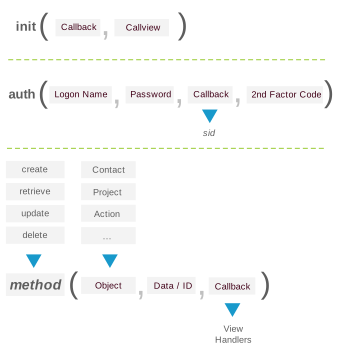
All SDKs use a common Create, Retrieve, Update & Delete (CRUD) pattern and access the mydigitalstructure platform using a consistent method-object-data-callback pattern.
|
|
|
| INIT |
|
| Callback |
The function/method to call once the method has completed. Return parameters include isLoggedOn:. |
| Callview |
The function/method that is called when something changes in the scope of the application - includes parameters status: and message:.
status values: 'request-start', 'request-end', 'error', 'info'
You can then directly update the view elements or pass the data to the to the view-model framework you are using.
|
| AUTH |
|
| Logon Name |
This is the users logon name, as set up using the mydigitalstructure console. |
| Password |
The users password that matches the logon name. |
| Callback |
This is the function/method that will be called once the auth method has completed - it can be a string or direct reference to the function. If the parameters returned to the callback function includes status: 'get2ndFactorCode', then you need to get the code from the user and then recall the auth method with the 2nd Factor Code parameter set. |
| 2nd Factor Code |
Code sent to the user via mobile phone or a like. |
| CRUD |
|
| Method |
The method name ie create, retrieve, update or delete. |
| Object |
The object you want to interact with ie Contact, Action, Invoice ... see full list. |
| Data / ID |
The json formatted data you are sending to the object; for the retrieve/delete methods you can set as the numeric ID.
For the create/update methods the data is the properties you want to set on the object; for delete it is the ID of the object and for retrieve it is the search criteria or the ID if just a single object instance you want to retrieve.
|
| Callback |
The function/method to call once the method has completed. |
|
|
In all cases you can manage your space (apps, users etc) using console.mydigitalstructure.com.
As as a developer you can sign up for free, and use the use this username / password to play with the SDKs.
All SDKs include a help method, which returns current application state and other useful information to assist with debugging.
Object definitions.
|
|
JAVASCRIPT
|
| Documentation |
Creates an object module mydigitalstructure, with the following methods:
- mydigitalstructure.init()
- mydigitalstructure.auth()
- mydigitalstructure.deauth()
- mydigitalstructure.create()
- mydigitalstructure.retrieve()
- mydigitalstructure.update()
- mydigitalstructure.delete()
- mydigitalstructure.help()
- mydigitalstructure.register()
- mydigitalstructure.reset()
more..
|
| Get/Install it |
Github (the latest core, the latest util) |
| Depends on |
jQuery, /jscripts/md5-min.js |
| Use it |
Core
../mydigitalstructure.x.x.x.js
App assembly utilities
../mydigitalstructure-util.x.x.x.js |
Hosting your
webapp |
mydigitalstructure includes webapp hosting or use your own hosting.
Setting up your first webapp. |
| More |
Javascript libraries, web frameworks |
|
| |
| NODEJS MODULE |
| npm i mydigitalstructure
more...
|
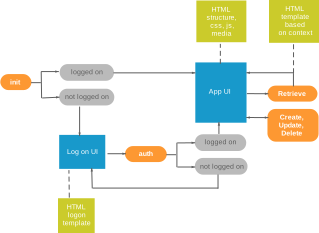
| TYPICAL APP FLOW |
|
|
|
|